Features
Every way a customer reaches you, answered.
Phone, website, text, WhatsApp, Google reviews — one AI front desk covers all five, then hands you the lead with the details already captured. Below is everything it does, with the product itself on screen.
The front desk, job by job
One AI front desk that works four jobs.
Not four products — one front desk doing the four jobs you'd hire for: answering, scheduling, following up, and fielding questions.
Answers every call, 24/7 — and knows what's an emergency.
It picks up when you can't — nights, weekends, both hands under a sink — in English and Spanish, and sorts the burst pipe from the tune-up.
- Emergency triage — a flooded basement never waits behind a filter change
- Texts you the details — caller, callback number, and what they need, while you're still on the job
- Every call recorded and transcribed — searchable in your dashboard, nothing lost
- Hands off when it should — real emergencies can ring your cell directly
Illustration of the real call flow — every call lands as a transcript in your dashboard.
Books the job into slots you control.
You open the windows; it fills them. Bookings are confirmed by text so the customer has it in writing and you have fewer no-shows.
- Your slots, your rules — it only offers times you've opened; it never overbooks your day
- Captures the whole job — service address, what's broken, and the time window, on the first contact
- Confirms and reminds by text — the Appointment Confirmation & Prep workflow runs automatically
- Connects to your calendar — Jobber and Calendly link natively; authorize once and bookings flow through
Illustration — confirmations send as real SMS from your business line.
Chases what you'd chase — if you ever had the time.
Ready-made workflows fire on real events — a missed call, a captured lead, a finished job — so the money stops leaking out the back of your day.
- Missed Call Recovery — a caller who hangs up gets a text before they dial your competitor
- Instant Lead Alert + Hot Lead Escalation — you know about a hot lead in seconds, not at dinner
- Seasonal Maintenance Reminder — brings last year's customers back before the season hits
- Review replies that post directly to Google — drafted for you, approved by you, published through your Google Business Profile. No copy-paste.
Illustration — the workflow names are the real templates that ship with every account.
Answers questions everywhere your customers type.
Website chat, SMS, WhatsApp — one brain trained on your business answers them all, and refuses to guess when it doesn't know.
- Trained on your website — your services, service area, and policies become its knowledge; update the site, it re-learns
- Grounded answers only — when it doesn't know, it says so and takes the customer's details instead of making something up
- Replies in the language your customer writes in — the 11 PM visitor typing in Spanish gets answered in Spanish
- Every conversation becomes a lead — name, number, and job details land in your dashboard, not a lost chat window
Illustration — the same chat is live on this site, bottom right.
The actual product
Everything lands in one dashboard.
These are real screenshots of the live product — leads, conversations, calls, and usage in one place, on your desk or in your pocket. Every lead shows who, where from, how urgent, and one button to respond.
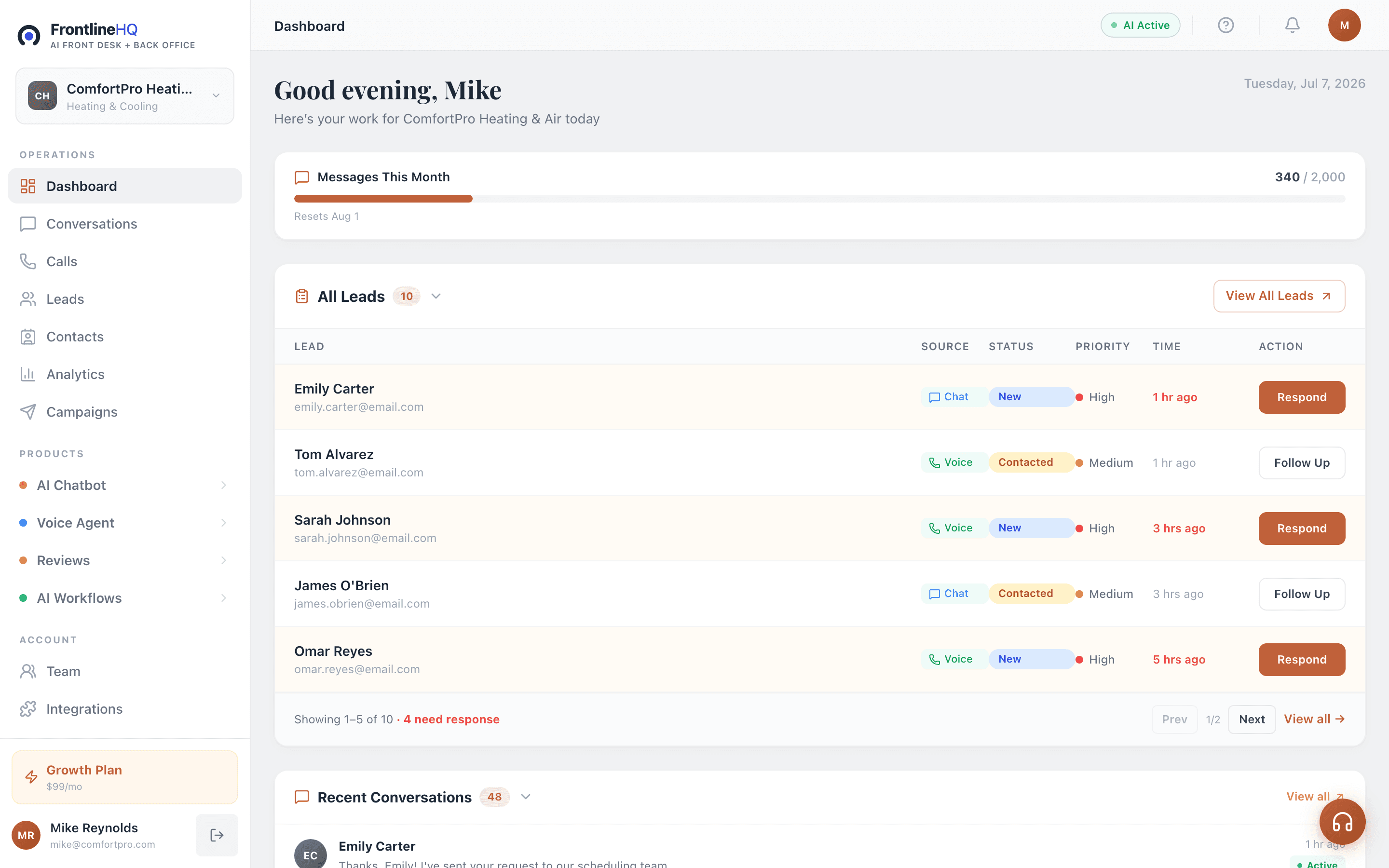
The desktop dashboard — leads ranked by priority, each one a tap away from a response.
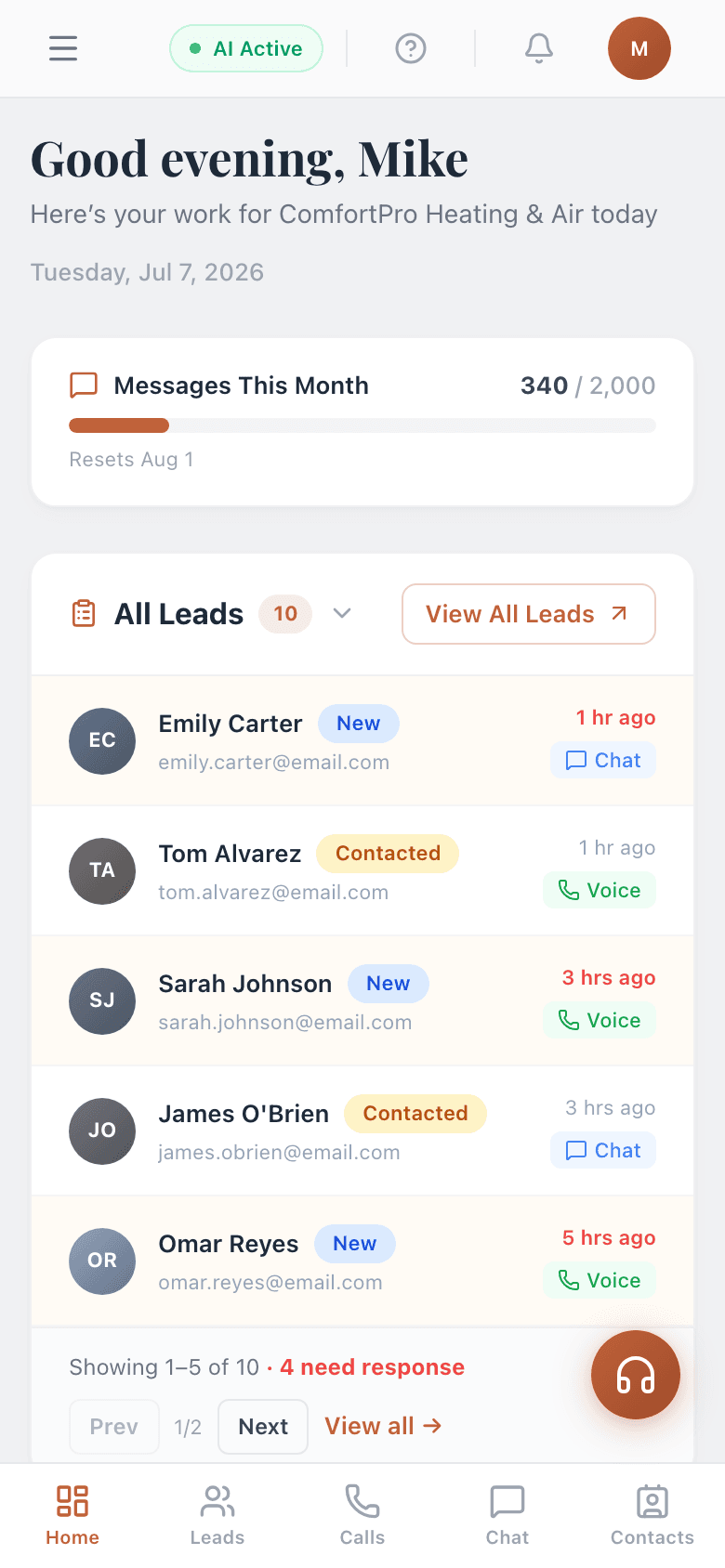
The same dashboard from the truck — full lead list on your phone.
The payroll math: a front-desk hire runs about $35,000 a year. FrontlineHQ is a small fraction of that, one flat monthly rate — and it never calls in sick.
Typical full-time front-desk salary before taxes and benefits; your market may vary.
Also in the box
The rest of the platform.
Everything below ships with the one plan. No add-on pricing, no feature gates.
Leads & contacts
Every caller, chatter, and texter becomes a contact with full history. Your customer list is yours — export it anytime.
One inbox, every channel
Website chat, SMS, and WhatsApp conversations in a single view — the AI's replies and yours, together.
Analytics
Calls answered, leads captured, conversations by channel, minutes used — the numbers an owner actually checks, without a dashboard science degree.
Call recordings & transcripts
Every AI-handled call is recorded and transcribed. Search old calls the way you'd search email.
English + Spanish voice
The voice agent answers in English and Spanish. Website chat replies in the language your customer writes in.
Human handoff
When a caller needs a person, the AI transfers the call to you or your on-call tech and flags it — it's built to hand off, not bluff its way through.
Guardrails on everything it says
On calls, chat, texts, and review replies, the AI is blocked from promising discounts, refunds, or anything you didn't authorize.
Security by default
Customer data encrypted at rest, strict per-business isolation, and audit logging. Your customers' numbers never leak into anyone else's account.
Works with what you already run
See all integrationsNative = direct connection you authorize once. Zapier and Make cover everything else your shop runs on.
Before you ask
The part that makes it easy to say yes.
Straight answers
What owners ask about the features.
The six questions that come up in every demo, answered without the fine print.
Will callers know they're talking to an AI?
Yes — it identifies itself as an AI assistant, which the law requires in a growing number of states and which we'd do anyway. What surprises owners is how little callers care once their problem is being handled: they want the leak fixed, not a debate about who answered.
What happens when it doesn't know the answer?
It says so and captures the caller's details instead of guessing. Every answer is grounded in your business's own information — your website, your services, your policies. If the answer isn't in there, the AI takes a message and the gap shows up in your dashboard so you can fill it in once, for good.
What languages does it speak?
On the phone: English and Spanish, switching automatically mid-call when the caller does. On website chat: it replies in the language your customer writes in — the customer sets the language, not a settings menu.
Do review replies really post to Google, or do I copy-paste?
They really post. You connect your Google Business Profile once, and approved replies publish directly to your profile — no copy-paste. You approve or edit every reply first. For platforms without a posting connection, like Yelp, it drafts the reply and you paste it in.
Do I need new hardware, a new number, or an IT guy?
None of the three. You forward your existing number — missed calls only, after-hours only, or everything, your choice. The chatbot is one line of code on your website (we place it for you during onboarding). Turn forwarding off yourself anytime — *73 on most carriers, or one setting with your phone provider.
Does it work with my scheduling software?
Jobber and Calendly connect natively — authorize once and bookings flow through. Google Business Profile, WhatsApp, SMS, and Slack are also direct connections. For everything else, Zapier and Make reach 7,000+ apps. Tell us what you schedule with during onboarding and we'll wire it up with you.
Call it right now — try to stump it.
That's a live AI demo line, answering today. Talk to the same AI your customers would reach and ask it the hardest question a caller has ever asked you.
Or start your 30-day free trial at frontlinehq.ai — set up in an afternoon.